Showing posts with label photo. Show all posts

Monday, August 16, 2010

How to Make the Most of Flickr for Grace Hopper

With the advent of digital cameras, we can all consider ourselves photographers. But what happens to the hundreds of photos you'll inevitably take at this year's Grace Hopper? Instead of letting them sit unopened on your hard drive, why not share them with fellow attendees and those who couldn't make it? The best place to do this is on Flickr!

Each year, a new Grace Hopper group is set up on Flickr where attendees upload their favourite images. For instance, check out the groups from 2007, 2008, and 2009. There's even a group up there for 2010 already. I still enjoy opening up the group for a year I attended and letting the happy memories return. I think this pool of photos is also an excellent way to get first timers excited about the next conference.

Here are a few how-to's to help you get started with Flickr.

How to get an account on Flickr if you don't already have one:

  1. Go to http://www.flickr.com/
  2. Click on the "Create Your Own Account" button
  3. If you happen to already have a Yahoo! account, you can just enter that in the appropriate text boxes (Yahoo! ID and password); otherwise, click on "Sign up for Yahoo!"
  4. Fill in the info and click "Create My Account" and follow any remaining instructions.

When you have a Flickr account, you can add photos to your own profile:

  1. After you log in, you will see a set of menu items along the top (Home, You, Organize & Create, etc).
  2. Click the little arrow beside "You" and click on "Upload Photos and Videos" near the bottom.
  3. Follow the instructions on the screen.
  4. Add titles, tags (e.g. ghc10 for Grace Hopper 2010), and (if you like) descriptions for the photos. These make it easier to organize and search your photos.
  5. Once your photos are uploaded you will see them when you click on "You" - clicking here brings you to your photostream, which is just a big long list of all your photos.
  6. You will probably want to organize your photos into sets (these are kind of like albums). Play around with the "Organize & Create" menu and be sure to consult the Flickr FAQ as needed.

You can join and add photos to a group:

  1. First navigate to and join a Flickr group (for example, the GHC2010 group).
  2. Once you're in a group you can start participating in discussions.
  3. Above the photos showing on the group's home page is a title called "Group Pool" - this refers to the "pool" of photos members add to the group. You will add photos that are already on your own profile as if the group pool were just another set your photos can belong to.
  4. Beside Group Pool click "Add Something?"
  5. You can choose up to 6 photos from our photo stream to be added to the group pool. You can do this as often as you like.
Link to or embed photos in other social media:

Once you have your photos uploaded to your profile, you may want to share them on other social media sites or include them in blog posts.
  1. Navigate to the photo you want to share. You can do this by clicking on "You" at the top, then clicking on the photo of choice.
  2. If you want to share just the link (say, on Twitter), click on "Share", "Grab the link" and then copy the text.
  3. If you want to embed a photo like I did below, click "Grab the HTML", change the size if needed, and copy that text. You can paste it into any editor that lets you write code. For example, on Blogger, you can switch to "Edit HTML" and paste the code where you want the photo to appear. Your photo will even be linked back to the original Flickr page so people can see it big!

Grace Hopper Celebration-9


Happy photographing! You'll find more ways to share the Grace Hopper Celebration experience at GHC Community Home.

Tuesday, September 29, 2009

The Hopper workout: volunteering at GHC09

I summed up my day of volunteering as a Hopper in less than 140 characters on Twitter:

@terriko terriko the #ghc09 Hopper workout: 3000 steps while doing upper body reps -- also known as filling all the conference bags with neat stuff!


But since a picture's worth a thousand words, and I'm also volunteering as a photographer and blogger, I thought I should put it all together for you to see how things are starting to come together here in Tuscon.

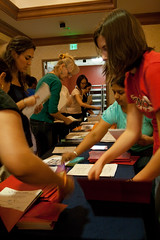
For the Monday Hopper assignments, we were filling the conference bags. The room was filled with tables, boxes, and volunteers. And those boxes are filled with cool stuff! I'm going to leave the bag contents as a surprise, but I've got to say it was neat to see tech company logos on women-oriented swag, as well as all the neat general tech swag we were packaging.

GHC09: Hopper volunteers walk around filling the bags


We found a few ways to speed up the process of filling the bags. Some Hoppers collected paper items together for easier grabbing. The rest of us walked around the room, over and over again, with a bag, grabbing swag from each box and filling it up. Many of us quickly discovered that we could do two bags at once if we put one on either arm and used both hands to fill them! But just because your hands were busy didn't mean you couldn't talk -- technology, research, teaching, working... As I moved around sometimes I only heard snatches of very cool conversations, and sometimes a few of us would synch up and walk together and chat. So many smart women, interested in stuff I think is cool! I totally eavesdropped every chance I could, and joined in when I could too.

GHC09 bags GHC09: Three lovely ladies package small swag GHC09: A demonstration of the two-handed bag stuffing technique GHC09: Filling folders


The problem with the two-hand technique is that your arms start to get sore from lifting and stuffing! And once my arms got sore, I got to thinking about how much exercise this was, so I grabbed my pedometer to see how many steps it was, and estimated back to figure out how many I did. Some of the other volunteers may have done more, since I stopped to take photos when my arms got tired!

The benefit to all this efficiency is that we finished super early, so it wasn't long before we were back out in the crazy hot Tuscon weather, enjoying the beautiful scenery:

The CU-WISE women - me + cactus at GHC09


PS - If you want some more photos to whet your appetite, you can see my GHC09 gallery or check out our GHC group on flickr! There are already pre-conference photos going up there!

GHC Bloggers Latest Updates