I’ve just returned from the Grace Hopper Celebration of Women in Computing (GHC) in Atlanta and had the opportunity to experience my first open source mini-codeathon and learn about the humanitarian open source project, Sahana Eden.Sahana Eden is an open source disaster management platform that can be used in a wide variety of ways to provide organization on the ground in the aftermath of a catastrophe.
Sunday, October 17, 2010
GHC Codeathon for Humanity
Wednesday, October 13, 2010
After the Grace Hopper Conference: There's More!
Your Feedback is Important
If you attended the conference please complete the GHC10 evaluation survey. The survey data will be independently reviewed and analyzed, then used both to report on the impact of this year's event and to improve future conferences. If you can't find the email with the evaluation link, look for a reminder from ABI's Caroline Simard early next week.
Session Notes, Slides, Blog Posts
Our speakers, volunteers, and many attendees have been posting their notes, slides, supplementary materials and links to related blog posts on our GHC10 notes wiki. If you presented, blogged about or took notes at GHC10, add your content or links to the wiki, too.
Photos and Videos:
- Our event photographer's photos on Flickr
- Add your own GHC10 photos to our Flickr group
- Watch and share GHC10 videos with our YouTube group
- In the coming weeks watch for videos of keynote speakers Barbara Liskov, Carol Bartz and Duy-Loan Le
Don't lose that great feeling of GHC community! Stay connected with the Grace Hopper Celebration Community through your Poken connections, Facebook, LinkedIn, Twitter, Systers and more. Get connected with the parent Anita Borg Institute Community for year round updates on ABI programs, research, and awards.
Save the Dates!
Mark your calendar for the Grace Hopper Celebration, November 8-12, 2011 in Portland, Oregon. Subscribe to the ABI e-newsletter to make sure you don't miss the Call for Participation, scholarship application deadlines and more.
Friday, October 8, 2010
Activities That Attract 4th-12th Grade Girls and Women to Computing

This was one of the most interactive sessions. The presenter was Barbara Ericson from Georgia Institute of Technology. On entering the conference room, the first thing that caught my attention was a number of green toy dinosaurs kept on the tables. I learned later that those were the Pleo Robots. The session was pure fun. Barbara has been working on investigating activities that attract students, and especially girls, to computing since 2004. She introduced PicoCrickets, Pleo robots, Scratch, and Alice to us one by one and we got hands on experience with Pleo Robots, PicoCricket and Scratch.
Pleo Robots : These are toy robots which the children can program. The robots have an SD card in them through which instructions are read and executed. The Pleo robot was a green dinosaur. It had sensors at some places on its body. When we initially got the robot, we started it and observed its behavior. It had a default program already installed which made it sing songs and move its tail. We also got to program the dinosaur through the Pleo software. Barbara had some of her students walk around the hall to guide us with the programming. The software for programming Pleo runs only on windows. It is a very easy interface which has a timeline and an action box. The action box contains actions like rolling eyes, moving feet, singing, jerking head in x degrees etc. One has to put actions on the timeline to program the robot. We programmed it, saved the file on the SD card, put the SD card back into the dinosaur and started it by thumping its back. The dinosaur has sensors and takes about 20 seconds to perform the programmed action in the SD card after starting the battery. Barbara called it "waking up" period of the dinosaur. The Pleo robot dinosaurs cost $349 each and their batteries last unto 60-90 minutes.
Scratch : This is a free program available on http://scratch.mit.edu/. Scratch is a programming language that makes it easy to create your own interactive stories, animations, games, music, and art. You can also share your creations on the web. The program has an easy to use interface for creating animations with tabs such as motion, looks, control, sound etc. I had a chat with Barbara after the talk and she mentioned that she observes very different behavior in girls and boys when they program the cat on the opening screen of the scratch software. The animations done by the girls are more on the lines of building a home for the cat or drawing flowers around it. On the other hand, the boys try to somehow kill the cat. This observation is a clear indication that we need to find ways aimed specifically at girls to attract them to computer science. Certain things which boys enjoy may not be enjoyable for the girls.
PicoCricket : This was another fun exercise. http://www.picocricket.com/whatisit.html. This is a commercial product and can be bought online. You can plug lights, motors, sensors, and other devices into a PicoCricket, then program them to react, interact, and communicate. We got a number of pico blocks which are simple hardware pieces such as LEDs and timers. Using the software picoblock, we wrote a simple program which measured our reaction time of pressing a button and displayed it on the timer.
The takeaway from the session was that there are variety of products and softwares available, which can be used effectively to attract school going girls and boys to computer science. Barbara has been organizing summer camps for highschool girls where she uses these tools to attract them towards computer science. One of her summer camp attendees is now a junior at Georgia Tech computer science program. Seeing the effect of Barbara's efforts in the form of this student impressed me the most about the session. In the chat with Barbara at the end of the session, she mentioned that their efforts are currently not targeted to get girls interested in specific areas of computer science. I work in security. I have observed that there are fewer girls in the core field of computer science such as systems, networks and security as compared to human computer interaction (HCI). I think the next step in this research would be a way to attract more girls towards these core areas of computer science.
Career and Economic Opportunity in Open Source Software
Monday, September 27, 2010
Grace Hopper 2010 - The Celebration Begins!
Packing for Atlanta! [update]
Here's what I packed (click the photo to go the Flickr page with notes):
Packing for Atlanta!
Even though we say GHC 2009, this episode applies to GHC 2010. I'm going to be packing much of the same things this year.
It looks like the weather in Atlanta for next few days will be in the 70s. Like last year, light layers will be really helpful. I think sunglasses and sunscreen are a must if you plan on being outside.
I haven't packed yet, so if I have time, I'm going to post a video of some speed packing! These are things I'm not going to forget to bring to GHC!
- Light jacket or in my case an adorable cardigan :)
- Water bottle
- Business cards (although I'm hoping that I'll get to use my Poken a lot!)
- Important documents (resume, schedule, boarding pass, etc.)
- Electronics (Egg [my netbook], video camera, digital camera, phone, etc.)
- Chargers!
- Tons of excitement :)
Thursday, September 16, 2010
New to Grace Hopper? So am I
- Plan ahead: There are a number of times when I have gotten to a conference or networking function and realized that I forgot my business cards. Not a good look for anyone. Make sure that you plan out what you will take with you to the conference. If you are presenting, guard your poster/powerpoint with your life. Just recently I managed to accidentally leave my poster at the security gate of the Pittsburgh International Airport. Fellow blogger Gail has a great entry on tips on planning for the conference. You can find her advice at Getting Ready For a Conference
- Attend the Conference: Conferences are great places to learn about new fields, meet new people, and connect with potential employers, collaborators, and/or friends. The key to taking advantage of potential opportunities is to ATTEND THE CONFERENCE. Simple concept, I know, but sometimes I feel the need to state the obvious.
- Elevator Pitch: You never know when you will find yourself in an elevator with or standing next to a potential employer. Have a short introduction of yourself prepared. Keep it short, sweet, and interesting. If your 90 seconds go over well, maybe you would piqued enough interest to continue the conversation. ~ Make it better ~ Got an iPad (or similar mobile device)? Upload a copy of your most recent poster to display your research if the opportunity presents itself.
Photo credits to www.diypuppytraining.com |
Monday, September 13, 2010
How to Make the Most of Twitter for Grace Hopper
Short on time? Jump to "Networking Face-to-Face to Twitter (and Back!)"
Twitter has hit mainstream. News anchors suggest following their account for the latest updates, companies updating their online presence create accounts, celebrities use it to create their own press. And it is a norm at conferences.
Grace Hopper is no exception to this rule. Read on to learn how to make the most of it! (PS – Folks to which Twitter is old hat, jump to the NEW! highlights.)
Setting Up Your Account
It’s okay to use Twitter to only follow others. BUT – if you’d like to use Twitter to connect with other people, there are some steps you will want to take.
- Personalize your account.
- Having a name, profile picture, and bio is your first defense against being assumed a spammer. If you prefer to be more anonymous, you can omit your last name or use a nickname and upload an image that is not a photo. (Keep in mind having a photo allows other conference participants to recognize you.) The main goal is to make you look like a real person. Since, you know, you are. :)
- Understand the impact of the “Protect my updates” setting
- With this setting on, others must request permission to see your updates. If you would like your updates to show up in the public stream, this setting must be turned off. To do this, log into Twitter, click Settings, scroll down and make sure “Protect my tweets” is NOT selected.
- Get out there and tweet!
- Most important way to distinguish yourself from spammers? Start updating your Twitter account! People don’t follow people who have never tweeted before. They want to know what you have in common and if you tweet about things they want to hear more about.
Twitter Basics for GHC
Use the #ghc10 hashtag for ALL (before, during, and after) GHC10-related tweets. Doing this ensures your related tweets show up in the conference Twitter stream (provided your tweets are not protected). You can view the real-time stream by searching for #ghc10 on Twitter. To add a hashtag, simply include #ghc10 somewhere in your tweet.
The official conference Twitter account is @ghc. Following @ghc connects you to the latest conference news. It is also the account to which you can direct GHC questions. (Make sure to include the conference hashtag in your tweet to @ghc. If someone else knows the answer, they may be able to respond before the official account can get a chance!) If the @ghc account is following you back, you can also address private messages by starting them with d ghc.
Before, During, After, All Year Round!
Session/Workshop Hashtags NEW!
I've already mentioned using the #ghc10 hashtag, but new this year are session/workshop hashtags. When tweeting during and about session/workshops, include BOTH the #ghc10 hashtag and the corresponding session/workshop hashtag. This provides context for those following your tweets and people looking at the overall #ghc10 conference stream.
Update Your Poken with you Twitter Details NEW!
I just found out about this so excuse my uber excitement, but Pokens are available to all GHC attendees this year! They are FREE for students and $15 for non-students. (Seems reasonable to me!) You simply touch your Poken device to the Poken of the person you’re connecting with to exchange contact info. So make sure your Poken includes your Twitter details!
Twitter Lists NEW!
If there is anyone on these lists that is of particular interest to you, make sure to follow that person so they show up on your Twitter homepage.
- @ghc/ghc10-attendees
- This is where you can find all the #ghc10 attendees that are on Twitter. If you're attending GHC and would like to be added to the list, tweet or send a direct message with your request to the @ghc account.
- @ghc/ghc10-speakers
- A great list where you can find all the presenters from GHC10 that are on Twitter.
- @ghc/communities-committee
- See all the tweets from the members of the GHC Communities Committee.
Networking Face-to-Face to Twitter (and Back!)
Include your Twitter name on your conference badge, so the people you meet know they can connect with you online.
If you pardon me jumping on a soap box a bit, Twitter is my ABSOLUTE FAVORITE way to network. The nature of Twitter allows users to loosely stay connected. There is no need for the formal replies email, LinkedIn messages, and even Facebook messages require. Twitterers can choose which tweets to comment on. This leads to awesome scenarios such as receiving a solution from a contact I would not have even thought to ask as a result of tweeting a challenge I was facing. The other general benefit of being connected to your network by Twitter is best described by the video Twitter in Plain English.
Do take advantage of (and feel completely free to!) follow people in the #ghc10 Twitter stream that are tweeting about things that interest you. The main chunk of my network from past GHC conferences was from connecting with the women on Twitter prior to the conference, briefly meeting them in person (if at all), and then getting to know them over the course of the year via Twitter! Now I look forward to meeting up with my tweeple in real life! :)
Glossary
RT – Abbreviation of the word retweet. Retweeting is the action of quoting another user’s tweet. You can either type in RT @username and copy/paste the message or use Twitter’s Retweet button. You would use the copy/paste method if you would like to add a comment.
Hashtag – A hashtag is a word, phrase (no spaces), or abbreviation that is preceded by the pound (#) sign. It acts as a tag in your tweet.
DM – Abbreviation for direct message. Direct messages are private messages. To send one, the recipient must be following your Twitter account. Precede your message with d username.
Tweeple – What I like to call the folks I interact with on Twitter. :)
Any suggestions or tweaks to my suggestions? Add your thoughts in the comments!
Friday, September 10, 2010
Transportation while in Atlanta for GHC10
To and from the airport:
The Hyatt and Marriott do NOT provide complimentary shuttle service to or from the airport.
Marta is the public transportation rail line in Atlanta. There is a rail station at the airport which will take you to within a block of the Hyatt and Marriott hotels. It will run about $3-4 one way from the airport to the Peachtree Center location on the red line. The ride is close to 20 minutes.
If you take a taxi, expect to pay around $30 for one way with extra charges for additional people.
If you call the Hyatt, they will hire a car which runs about $40-50 one way.
All the places I listed in a previous post for sightseeing were within walking distance of the hotels so you would not really need transportation.
Sunday, August 29, 2010
Places to Eat while at GHC10 from the local chair
Sun Dial Restaurant Bar & View on top of the Westin Peachtree Tower
American, New American & Specialty Cuisine. The food and ambience are exceptional. Expensive. Reservations are required. 210 Peachtree Street Northwest, Atlanta, GA 30303-1704 (404) 589-7506 sundialrestaurant.com
Ted's Montana Grill on Luckie Street
American & Buffalo Cuisine. I have never had a bad meal at this restaurant. Moderate. No reservations, but sometimes a wait. 133 Luckie St NW, Atlanta, Georgia 30303 (404) 521-9796 tedsmontanagrill.com
Azio Downtown Downtown
Italian Cuisine. I do have a weakness for pasta and this did fill the bill. Moderate. Walk-ins and reservations. 229 Peachtree St NE, Atlanta, GA 30303-1601 (404) 222-0808 aziodowntown.com
Max Lagers Woodfired Grille
American, Continental, Brewpub Cuisine. Burgers and beer, great combination. Moderate. No reservations. 320 Peachtree Street Northeast, Atlanta, GA 30308-3210 (404) 525-4400 maxlagers.com
Hsu's At Peachtree Center
Asian, Chinese Cuisine. Everyone in the party enjoyed their meals. Moderate. Reservations recommended. 192 Peachtree Center Avenue Northeast, Atlanta, GA 30303-1712 (404) 659-2788 hsus.com
Friday, August 27, 2010
Things to do in Atlanta when attending GHC10
Enjoy a truly unique experience at World of Coca-Cola, a grand museum dedicated to the world’s most popular soft drink. Coca-Cola’s world headquarters is in Atlanta, so it ‘s fitting that there is a museum devoted exclusively to that sweet brown liquid in the bright red can. Along with decades of marketing imagery and product chronology, there are more interactive features such as the working soda fountain and Coke tastings. The exhibits take you on a truly magical tour telling the story of Coca-Cola’s evolution from nineteenth-century beginnings to its global expansion in over 200 countries around the world. World of Coca-Cola is adjacent to Underground Atlanta.
CNN STUDIO TOUR http://www.cnn.com/tour/atlanta/
A fun thing to do on a rainy or steamy day in Atlanta is to take a tour of CNN’s World Headquarters studios. You will get a behind-the-scenes peek at CNN’s off-camera persona, as well as that of some affiliate networks, such as Headline News. The brief but informative 50-minute guided tour will lead you through the studio trenches to show you what it takes to produce and maintain a world-renowned, live, 24-hour news channel. You’ll see a working newsroom, control room, learn the wonders of the teleprompter and meet Ted Turner himself—on video, of course.
UNDERGROUND ATLANTA http://www.underground-atlanta.com/
Underground Atlanta is a historic building containing five blocks of cobblestone streets home to a wide variety of shops, restaurants, bars and special events. There’s even a guided history tour that introduces tourists to the building’s past life, commonly unknown to locals. During the day, an assortment of street vendors and entertainment makes this a great place to bring the kids. When the sun goes down, Underground Atlanta heats up with live music, dancing and the usual after-midnight scene. No matter when you choose to go, there is always something to see.
IMAGINE IT! - Children’s Museum http://www.childrensmuseumatlanta.org/
A child’s heaven! Imagine It! is a place where kids can have fun and learn, without knowing they’re doing both. With everything at kid level, they can touch, explore, create and invent. For kids and adults, boredom is a foreign word. Along with special programs, the museum’s exhibits are innovative, interactive and educational. For those traveling with young children, this is a must-do experience.
Wednesday, August 18, 2010
How to Make the Most of Facebook for Grace Hopper
Setting up Your Facebook Account
If you don't have a profile on Facebook, you can set one up by going to the site and signing up. If you have concerns about privacy, there are options on Facebook that let you secure your information. For example, I tend to keep my profile fairly locked down - I don't turn up in public searches and if you aren't my 'friend' on the site, you can't see any of the details of my profile, including photos, my wall, and videos I'm in. I don't list the year I was born or give out my specific address or phone number, either, and I'm pretty careful about who I add as a 'friend'. Facebook's Safety Center has more tips and advice on staying safe on the site.
Just because you've locked down your profile doesn't mean you can't use Facebook to network, however! I'll mention several tips throughout the post, but one neat feature of the site I use is its 'lists' (Facebook has a useful FAQ with details on how to set them up and use them here). For example, you can set up a list called 'ghc10 attendees', and if/when you decide to connect with someone from the conference, you can add them to this list. This is useful for two reasons: first, you can keep track of where you met people and when you follow up with them after the conference, it will be easy to find them in your contact list. Second, you can restrict your profile for that list, so that you only reveal some of your personal information. That way you can maintain your privacy but still use the useful features of Facebook to keep in touch with your new GHC buddies.
Before the Conference
Before the conference you might not yet know any of the other attendees - but you can still interact with them (even without adding them as friends) by perusing our Grace Hopper Celebration page on Facebook and discussion boards. You'll find conversations on all sorts of topics, from introductions, to your favorite memories of the conference, to the very helpful rides & roommates discussion, which several attendees have successfully used already to find accommodations, roommates, and transportation for the conference! Finally, don't forget to RSVP to the GHC 2010 event on our Facebook page to let others know that you'll be attending!
During the Conference
During the conference is a great time to add your connections on Facebook. I found that you meet so many people it can be really overwhelming, so keeping up as it goes along is much easier than trying to do it all later, especially once you are back to your regular work/study schedule. When adding people, Facebook allows you to add a message to your invitation to connect. I strongly suggest adding a personalized message so they can easily remember who you are and the context they met you in - especially since they will likely receive a tonne of invitations during the conference! Something like "Hi ____, it was great meeting you at GHC today and chatting about our careers in networking. Let's keep in touch!"
After the Conference
Facebook provides several ways to keep in touch with your new-found connections. You can send private messages, write on your connections' walls, and of course keep posting on our Facebook group page! Keeping your profile updated can help you too - you never know when you might meet your connections again. I've found that several friends joined my company long after the conference was over - and since they updated their profiles I knew about it and was able to reconnect with them once they had arrived, which has been pretty cool!
All Year Round
Keep in mind that our GHC page and discussions are up long before the conference, and are useful for other things than just logistics. For example, for GHC 2008, I met several other female students from around the world on the GHC page. We discussed presentation ideas and put together a BOF that was eventually accepted for the conference! If you've got a cool idea for GHC, keep it in mind and feel free to share with us. You might just find some great co-presenters or get the perfect feedback to help make your proposal the best it can be!
Do you have Facebook tips, advice, or recommendations? How have you used Facebook to aid in networking? We'd love to hear them, so feel free to share them in the comments below.
You can learn more about other Grace Hopper communities on this blog all week, or by checking out the communities page on the Grace Hopper site!
How to Make the Most of LinkedIn for Grace Hopper
Once your profile is created, you can join the Anita Borg Institute group and the Grace Hopper Celebration subgroup, where you can join the conversation that's already buzzing about the upcoming conference, start scanning job opportunities posted to the ABI group page, and making connections with the recruiters that will be coming to Grace Hopper this year.
Setting up a basic profile in LinkedIn is pretty easy - the website will walk you through the steps, but if you want people to feel comfortable with you and start connecting, then you need to go beyond just the basics.
LinkedIn is like an online resume, but unlike your resume you don't have to worry as much about going over one page. In addition to listing your past employers, fill in details about the work you did at each place. You should also fill in your education details, listing any activities you participated in at school, like ACM. LinkedIn will then allow you to find connections at your school and employers, which will help increase your network and exposure in the site.
The more you personalize your page, the more it will look like it belongs to an actual human and people will be more willing to link with you. You can do this in several ways. I suggest adding a recent photograph, but make sure you look professional (pictures from spring break doing shots on the beach would probably not make the best first impression :). A summary, or bio, at the top is a quick way to let people know what you do and what type of technologies you're interested in.
Find connections! LinkedIn makes searching for people you may know very easy, as it finds people who worked at the same employer at the same time, or attended the same University at the same time. Once you start making connections, you can go through your connections' connections to find more people you know, and request that they connect with you.
Adding links to your personal website and blog, if you have them, is another great way to let people learn more about you without cluttering your page.
One thing to keep in mind is that while LinkedIn is a great place to find a job, you should also keep your page updated even when you are not actively looking. You never know when you suddenly may need a new job, or when a great opportunity may find you through LinkedIn. Growing your network is valuable all year round!
A word of caution: people generally don't like to see the generic spam from any social networking site when you load in your email address book. So, instead of doing that, send only specific, targeted invitations to people that have not yet joined that you want to connect with - and take time to explain why you want to connect.
Once you have everything set up, join the conversation in the Grace Hopper Group!
Any more LinkedIn tips or tricks? What have you done to grow your network?
You can learn more about other Grace Hopper communities on this blog all week, or by checking out the communities page on the Grace Hopper site!
Monday, August 16, 2010
How to Make the Most of Flickr for Grace Hopper
Each year, a new Grace Hopper group is set up on Flickr where attendees upload their favourite images. For instance, check out the groups from 2007, 2008, and 2009. There's even a group up there for 2010 already. I still enjoy opening up the group for a year I attended and letting the happy memories return. I think this pool of photos is also an excellent way to get first timers excited about the next conference.
Here are a few how-to's to help you get started with Flickr.
How to get an account on Flickr if you don't already have one:
- Go to http://www.flickr.com/
- Click on the "Create Your Own Account" button
- If you happen to already have a Yahoo! account, you can just enter that in the appropriate text boxes (Yahoo! ID and password); otherwise, click on "Sign up for Yahoo!"
- Fill in the info and click "Create My Account" and follow any remaining instructions.
When you have a Flickr account, you can add photos to your own profile:
- After you log in, you will see a set of menu items along the top (Home, You, Organize & Create, etc).
- Click the little arrow beside "You" and click on "Upload Photos and Videos" near the bottom.
- Follow the instructions on the screen.
- Add titles, tags (e.g. ghc10 for Grace Hopper 2010), and (if you like) descriptions for the photos. These make it easier to organize and search your photos.
- Once your photos are uploaded you will see them when you click on "You" - clicking here brings you to your photostream, which is just a big long list of all your photos.
- You will probably want to organize your photos into sets (these are kind of like albums). Play around with the "Organize & Create" menu and be sure to consult the Flickr FAQ as needed.
You can join and add photos to a group:
- First navigate to and join a Flickr group (for example, the GHC2010 group).
- Once you're in a group you can start participating in discussions.
- Above the photos showing on the group's home page is a title called "Group Pool" - this refers to the "pool" of photos members add to the group. You will add photos that are already on your own profile as if the group pool were just another set your photos can belong to.
- Beside Group Pool click "Add Something?"
- You can choose up to 6 photos from our photo stream to be added to the group pool. You can do this as often as you like.
Once you have your photos uploaded to your profile, you may want to share them on other social media sites or include them in blog posts.
- Navigate to the photo you want to share. You can do this by clicking on "You" at the top, then clicking on the photo of choice.
- If you want to share just the link (say, on Twitter), click on "Share", "Grab the link" and then copy the text.
- If you want to embed a photo like I did below, click "Grab the HTML", change the size if needed, and copy that text. You can paste it into any editor that lets you write code. For example, on Blogger, you can switch to "Edit HTML" and paste the code where you want the photo to appear. Your photo will even be linked back to the original Flickr page so people can see it big!
Happy photographing! You'll find more ways to share the Grace Hopper Celebration experience at GHC Community Home.
Friday, August 6, 2010
Meet the GHC10 Communities Committee!
In the last few weeks they've become more visible as GHC community evangelists. Across our GHC online communities on Facebook, LinkedIn, Twitter, Flickr, and the GHC Blog they're starting conversations, sharing introductions and favorite GHC memories, and inviting participation by community members.
Many of our hard-working Grace Hopper committees complete their tasks well before the conference: selecting program submissions and scholarship recipients, recommending speakers, and deciding on award winners. Not so for this committee, which is a new addition this year. They'll Keep working right through Grace Hopper to help you connect online before, during and (if I know them) even after the conference. So here's a quick introduction to the committee members:
![]() | Co-Chair Ashley Myers just completed her undergraduate CS degree at DePauw University and will start at Microsoft later this month. She helps with the @ghc Twitter account and will co-moderate the Grace Hopper Celebration 2010 group on YouTube. Learn more about Ashley on the GHC blog in her post Introducing a Recent Undergrad Graduate. |
![]() | Co-Chair Erin ‘Ed’ Donahue also started coming to GHC as a DePauw student and now works at Lockheed Martin, a career connection she made at the 2008 conference. Learn more about Ed in her blog post Hi! My name is Ed! With Ashley, Ed helps with the @ghc account and will co-moderate the YouTube group. They also host Ed & Ashley's 5 Minute Show, featuring interviews with technical women interviewed at GHC and other events. |
![]() | Gail Carmichael is a doctoral candidate at Carleton University. Gail is the lead for our GHC bloggers and note-takers again this year, and also taking a leadership role on the GHC10 group on Flickr. Learn more about Gail on the GHC blog and check out her blog The Female Perspective of Computer Science. |
![]() | Kate Tsoukalas is a graduate of Simon Fraser University and now works at Microsoft. Kate helps moderate the Grace Hopper Celebration page on Facebook. Join Kate in Discussions on the Grace Hopper Celebration page on Facebook (requires login). |
![]() | Valerie Bubb Fenwick is a Principal Software Engineer at Oracle, arriving through the Sun acquisition. Valerie helps manage the Anita Borg Institute and Grace Hopper Celebration groups on LinkedIn. Learn more about Valerie in the Introduce Yourself! discussion on LinkedIn or Facebook. |
And watch for upcoming blog posts from committee members on how to make the best use of each GHC online community. Meanwhile:
- If you're coming to the conference, introduce yourself to the community.
- If you've attended Grace Hopper before, share your favorite memory.
- Follow @ghc/communities-committee to connect with these evangelists on Twitter.
- Sign up for the ghc10-attendees Twitter list when you register for GHC10.
Monday, July 12, 2010
My Favourite Grace Hopper Memories
I picked a few of my favourite memories to share on my own blog. I hope you'll go check it out, then come back here and comment with your own memories.
Maybe you could pull up some of your past conference photos on Flickr, or find your favourites in the GHC09 Flickr group. Post the photos that give you the fondest memories on Facebook, Twitter, LinkedIn, or even here on the blog! You can find links to all the Grace Hopper online communities here.
Thursday, July 8, 2010
Introducing a Recent Undergrad Graduate

- Twitter: @OrganizeFISH (I will also be tweeting as @ghc, look for my signature ^amm)
- Blog: "Let's Eat That Big Fish!"
- Ed & Ashley's 5 Minute Show
- YouTube
Tuesday, July 6, 2010
3 Women, 2 Grace Hopper Conferences, 1 Global Collaboration
Three of the memorable women I talked with at Grace Hopper (GHC) in 2009 were Shikoh Gitau, a student researcher from South Africa, and Mary Hudachek-Buswell and Stefanie Markham, the local chairs for this year’s conference in Atlanta. These women forged a strong connection at GHC 2009 that has continued to develop, resulting in a panel to be presented at GHC 2010. Earlier this year Mary shared how she and Shikoh first connected: through our Grace Hopper 2009 Rides & Roommates discussion on Facebook. It’s such a great Grace Hopper story that I asked them to share it here on the GHC blog.
Mary’s story: Meeting Shikoh at GHC09
Last year was my first time to experience the inspiration of GHC. It was a long anticipated trip since GHC has always been something I wanted to participate in, but had not had the opportunity to do so in the past. I was asked to serve as the local chair for GHC10, and I just had to get to Tucson for GHC09. I decided to immerse myself in the experience of attending before traveling by reading the posts on Facebook and LinkedIn as the time approached. In order to save travel money with the budget crunch, I had to fly into Phoenix and drive to Tucson in a rental car. I kept noticing people posting requests for rides, meetings, or attending some sightseeing events together. I thought it was a great idea to communicate in this way. I liken it to listening in on a huge girls' gab session where they were all discussing going to THE party of the year. I became slightly addicted to reading the blogs, posts, and tweets which fed my excitement in attending GHC09. Occasionally, the thought would enter my mind, "What if GHC didn't measure up to my hopes and vision that I built up in mind?"I was going to GHC09 with my Computer Science "sister", Stefanie Markham. As the time approached and anticipation mounted, I took the plunge and began participating in the online conversations. There was a post from a young woman in Cape Town, South Africa who needed a ride to Tucson from the Phoenix airport the day before the conference started. I had space in the car with only Stef and me driving down from Phoenix, so why not? It was the day and time we were arriving, and it would only cost sharing a couple of hours with a stranger in a small car in the middle of the desert. So Shikoh Gitau and I began coordinating online how we would meet, since phoning was out of the question. I gave Shikoh my cell number to call the day I would arrive in Phoenix. That was how we left it. Would she actually be there from South Africa? What did she really know about me? We each gave a leap of faith based on our common bond for what GHC could hold for both us.
Stef and I landed in Phoenix, finally got our bags, located the rental car facility, and finally got the car (seemed like hours). All the while playing phone tag with Shikoh. What Shikoh must have thought of the two crazy women from Atlanta. We met in an underground parking lot in Phoenix on what seemed like the hottest day of the year. As we began our drive to Tucson, (yes there were wrong turns as I was the driver) we got to know about each other and how our paths led us to GHC09. Shikoh had the same spirit as Stef and me, and a passion for furthering women in computing. Our new acquaintance with each other was fast growing into a tentative friendship as we filled every minute of the two hour drive with giddy discussion. We arrived at the resort and Shikoh determined she needed to be at a hotel somewhere else in downtown Tucson and there were no shuttles to get her there. Stef and I quickly checked into our room, and then headed out to take Shikoh to her hotel at the University of Arizona, as wel as a couple of other stranded students. Stefanie and I dropped the young women off, and then headed out to explore Arizona after a stop for fast food. We thought this would be our last encounter with Shikoh.
Not so! First thing the next morning and throughout the week, I continued to run into Shikoh and we would share our viewpoints, ideas, and information from sessions. We talked about how we should do something together for a future GHC. As we discussed the important issue of gender based violence after Megan Smith's speech, an idea came to the forefront of what we might be able to do. It was one of those goosebump moments in your life where you realize you might actually be able to make a real change in the world for the greater good. Our idea continued to grow, and plans were sketched out before we departed for our separate parts of the world. Both of us were forever changed by our meeting and connection to GHC. We have communicated electronically over the last 8 months, and our panel Take Back the Tech (Part II) was accepted to GHC10. We have a dream to harness technology in order to end violence against women in third world countries.
Shikoh’s story: Meeting Mary and Stef at GHC09
After receiving the news that my poster had been accepted for the GHC and that I had a travel scholarship to go all the way to Arizona, I was ecstatic. After all the excitement cooled down, I got right into planning how I was going to get myself SAFELY to Tucson. The Cape Town – Arizona flight takes about 24hours, so to beat the 11 hour jetlag I planned to arrive a day early. However, my funding did not cover the extra night so I first scanned my over 800 Facebook friends list to see who among my former classmates and friends lived in the area. The nearest I got was Phoenix, Arizona. They were very kind to host me for the one night. The next problem I encountered was to get to the hotel in Tucson from Phoenix. I joined the GHC fan page to see who was doing what, and posted my need for a ride to Tucson. Being from Africa, I am very wary of this kind of arrangement, Hollywood does not instill much confidence in as far as the great American desert is concerned. I had seen all sorts of imposter and hijacking movies, but I cast away the fears and went to the underground parking lot of the Phoenix Airport. With no pictures to view, I had to work with clothing color in order to identify Mary and Stef.The U.S. was very new to me, so they brought me up to date with the whole being an American ritual. In that drive, I gained good friends and mentors as we headed towards GHC09 in what I regard as the greatest gathering on earth. Previous to the trip, I read a lot of what was presented in GHC, and came away feeling like an odd ball. My research in computer science was totally different from anything anyone was presenting, and needless to say I felt like an imposter. So as we exchanged our research approaches, I ended mine by saying that I am not “a real computer scientist”. The reaction from both Mary and Stef was not what I expected. They in unison told me to never ever say that, and stated that my research was great. It was good that I met these women and they had told me my work was good, because in the coming days, I continued to experience the “I am not a real computer scientist” thing, and they were there to correct me at every turn. After the keynote speech by Megan Smith (Google), they both came hunting after me with an “I told you so” expression written all over their faces. I have to say they were right; my research is indeed real computer science research. The meeting and discussion thereafter lead to the organization of Take Back the Tech (Part II), a panel at GHC10 that will bring together women from industry, academia, women’s rights activist as well as feminist organizations to discuss technology and gender based violence. We hope to have a concrete technological intervention as result of this panel as well as the continuing conversation.
Join Shikoh and Mary in the Grace Hopper Celebration session Take Back the Tech (Part II): A Feminist and Techie Dialogue on taking control of technology to end violence against women from 4:15 p.m. – 5:15 p.m. on Friday, October 1, 2010.
If you seek a ride or roommate for GHC, look for Grace Hopper 2010 Rides & Roommates on the Discussions tab of our Facebook page. And make your own pre-conference connections through our GHC online communities.
Do you have a story of a great connection made at the Grace Hopper Celebration? Tell us about it!
Wednesday, June 30, 2010
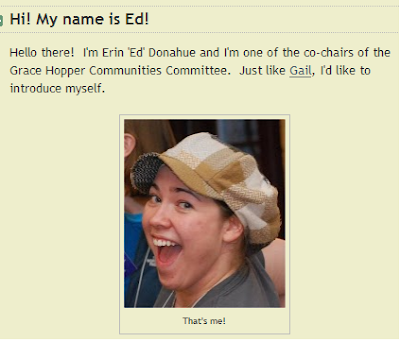
Hi! My name is Ed!
![]() |
| That's me! |
I went to my first GHC in 2008 with my good friend and forever roommate Ashley. Just before leaving for the conference, we decided we want to be video bloggers and so we created Ed & Ashley's 5 Minute Show. Since then, we've continued to do our 5 minute show, focusing on technical women.
In May 2009, I graduated from DePauw University in Greencastle, IN and moved to Colorado for my first job as a software engineer with Lockheed Martin. Working a full-time job is totally different from being in school, that's for sure! I'm learning new stuff everyday (although that did happen in school too). Out here in Colorado, I organize the Colorado Front Range Girl Geek Dinners. If you're ever in Colorado, please stop by!
I also love to salsa dance, play rugby, swim, and nap outside on my balcony. :)
I'm online! Connect with me!
- Twitter: @creepyed (I also tweet as @ghc, look for my signature ^ed)
- Ed & Ashley's 5 Minute Show
- YouTube
GHC Bloggers Latest Updates
-
Ep. 0 – Introducing Signal from Noise - Introducing Signal from Noise with your host Charna Parkey. Aside from sleep, working takes up the second largest time block in our lives. And we spend mos...6 years ago
-
GHC15: Friday Twitter Roundup! - [View the story "GHC15: Friday Twitter Roundup" on Storify]10 years ago
-